

Before you begin
Any team member can view a customer’s details. Editing requires the same access as adding a customer — any team member can edit most fields; enabling payments requires a supplier administrator.Business details
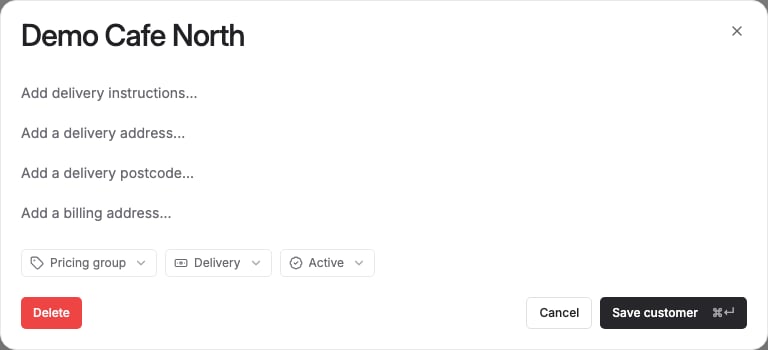
- Name — the customer’s business name. Required.
Billing and delivery
- Billing address
- Delivery address
- Delivery instructions — free text shown to whoever picks and delivers the order.
- Postcode — used to match the customer against your delivery zones.
Ordering settings
- Pricing group — which of your pricing groups this customer buys at. This determines which products they can see and order, not just their price. Clearing this field means the customer can’t order any products at all, not even at your default pricing, so only clear it deliberately. See the Pricing guide for how pricing groups work, and Assign pricing to customers for this step in full.
- Delivery fee — which delivery fee applies to this customer’s orders.
Account settings
- Availability — Active or Inactive. This is a status flag on the customer record; see Archive or remove a customer for how this differs from deleting a customer.
- Payments — whether payment collection is enabled for this customer. Visible and editable only if your business has payments enabled, and only by a supplier administrator.