> ## Documentation Index
> Fetch the complete documentation index at: https://docs.fikatrade.com/llms.txt
> Use this file to discover all available pages before exploring further.
# Sales accounts
> What sales accounts are, how to create them, and how they connect your products to your accounting.
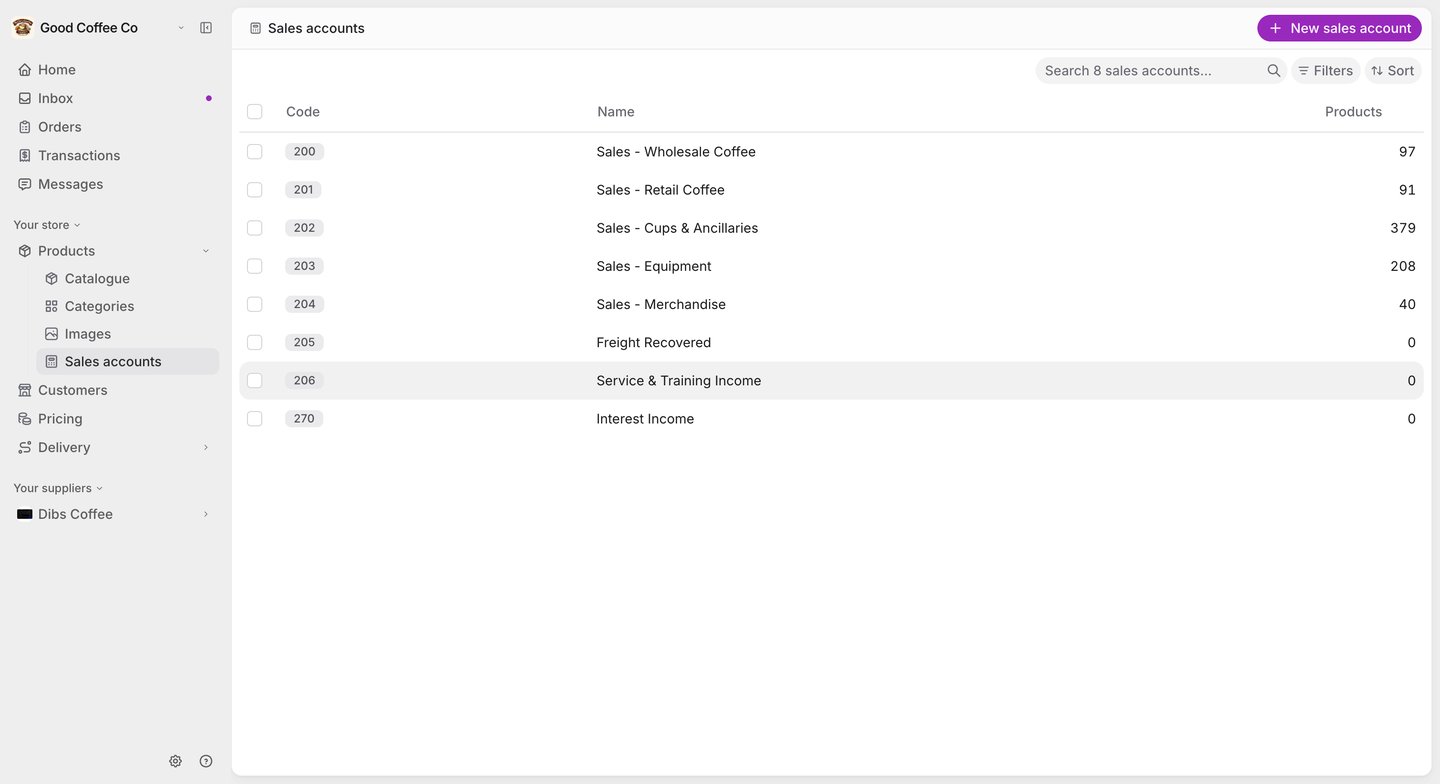
A **sales account** is the income account a product's sales are recorded against — for example *200 Sales - Wholesale Coffee*. Each product can have one, and it's carried onto invoices and into Xero.
**New 2026-10-17:** the Sales accounts screen has been live since August 2026 but wasn't documented until now.
 ## Before you begin
You need to be a **supplier administrator** to view or manage sales accounts.
If you've connected Xero, your Xero sales accounts are brought into FikaTrade and kept in step on the Sync screen — see [Two-way product sync with Xero](/supplier-guide/invoicing/two-way-product-sync-with-xero).
## Create a sales account
1. Go to **Products → Sales accounts** and select **New sales account**.
2. Enter a **Sales account code** — it must be unique — and an optional **Sales account name**.
3. Select **Create sales account**.
## Assign a sales account to a product
Choose the **Sales account** when you create or edit a product. You can also set it for many products at once with the catalogue's bulk update, or through a [products import](/supplier-guide/getting-started/imports).
A sales account only affects how sales are grouped and reported. It doesn't change which customers can buy a product or what they pay — pricing groups decide that.
## Edit or delete a sales account
Select an account in the list to edit its code or name. Changes apply from then on; orders and invoices already created keep the account they were created with.
Deleting a sales account is permanent. FikaTrade won't let you delete one that products still depend on — it tells you why instead.
## Related guides
* [View and manage products](/supplier-guide/products/manage-products)
* [Product codes and tax settings](/supplier-guide/products/codes-and-tax-settings)
* [Xero mappings](/supplier-guide/invoicing/xero-mappings)
This documentation is built and hosted on [Mintlify](https://mintlify.com), a developer documentation platform.
## Before you begin
You need to be a **supplier administrator** to view or manage sales accounts.
If you've connected Xero, your Xero sales accounts are brought into FikaTrade and kept in step on the Sync screen — see [Two-way product sync with Xero](/supplier-guide/invoicing/two-way-product-sync-with-xero).
## Create a sales account
1. Go to **Products → Sales accounts** and select **New sales account**.
2. Enter a **Sales account code** — it must be unique — and an optional **Sales account name**.
3. Select **Create sales account**.
## Assign a sales account to a product
Choose the **Sales account** when you create or edit a product. You can also set it for many products at once with the catalogue's bulk update, or through a [products import](/supplier-guide/getting-started/imports).
A sales account only affects how sales are grouped and reported. It doesn't change which customers can buy a product or what they pay — pricing groups decide that.
## Edit or delete a sales account
Select an account in the list to edit its code or name. Changes apply from then on; orders and invoices already created keep the account they were created with.
Deleting a sales account is permanent. FikaTrade won't let you delete one that products still depend on — it tells you why instead.
## Related guides
* [View and manage products](/supplier-guide/products/manage-products)
* [Product codes and tax settings](/supplier-guide/products/codes-and-tax-settings)
* [Xero mappings](/supplier-guide/invoicing/xero-mappings)
This documentation is built and hosted on [Mintlify](https://mintlify.com), a developer documentation platform.